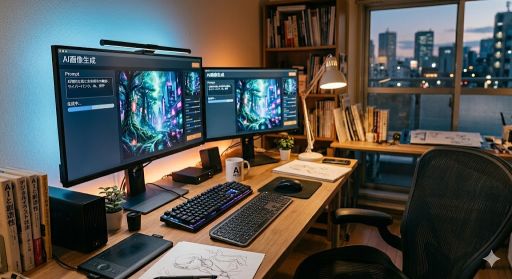
*上画像は当サイトにてAIで作成。
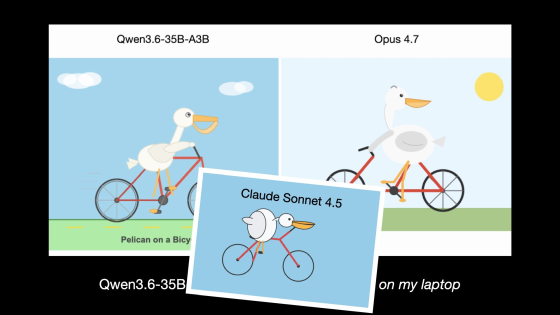
AIベンチマーク「自転車に乗ったペリカンを描く」をGemini 3.1 ProやQwen3.6-35B-A3Bにやってもらうとこうなる
AIの性能を測るベンチマークにはさまざまなものがありますが、その中でも少し変わっているのがソフトウェア開発者のサイモン・ウィリソン氏が使っている「自転車に乗ったペリカンを描かせる」というテスト。PyCon US 2026の5分間ライトニング...
gigazine.net
ざっくり説明
「自転車に乗ったペリカンを描く」をSVG画像で出力するチャットAIのベンチマークが公開された。
1年間で劇的に改善。
明確には書かれていないけど、このベンチマークは画像生成ではなくテキストの出力を画像評価していると思う。にゃあ。
面白い。にゃあ。
???
画像生成してるでしょ?
”SVG画像で”というのが重要。にゃあ。
SVGはテキストだけで構成された画像ファイル。にゃあ。
音楽で例を示すと
画像を出力(PNGなど) → 音楽を出力(mp3など)
SVG画像を出力 → 楽譜を出力
というイメージ。にゃあ。
記事で生成された画像を見るとAIで生成された画像よりもシンプルに見えるのはそのため。にゃあ。
なんとなくわかったわ。描き方をテキストで出力してる感じね。
実際にGeminiでVRゴーグルをかけた猫の画像を画像生成(左側)とSVGで出力(右側)してみた。にゃあ。

左側はGeminiの画像生成で作成された画像で、右側はGeminiのテキスト出力で作成された画像ということになる。にゃあ。
全然クオリティ違うのね。
SVGは図形の組み合わせだし、制約がいろいろある。にゃあ。
むしろ、ここまで描けるようになっていたのは驚き。にゃあ。
JS+CanvasとかでLLMで強引に絵を描かせることはできると知っていたんだけど、思っていたよりはるかにすごい。にゃあ。
使うとか使わないとか、じゃない。にゃあ。
おまけに出力されたSVGをテキストで張っておく。にゃあ。
<svg xmlns="http://www.w3.org/2000/svg" viewBox="0 0 400 400" width="100%" height="100%">
  <defs>
    <radialGradient id="bgGrad" cx="50%" cy="50%" r="70%">
      <stop offset="0%" stop-color="#251b45"/>
      <stop offset="100%" stop-color="#0b061a"/>
    </radialGradient>

    <linearGradient id="furGrad" x1="0%" y1="0%" x2="0%" y2="100%">
      <stop offset="0%" stop-color="#f0f0f5"/>
      <stop offset="100%" stop-color="#b0b5c2"/>
    </linearGradient>

    <linearGradient id="earGrad" x1="0%" y1="0%" x2="0%" y2="100%">
      <stop offset="0%" stop-color="#ffb6c1"/>
      <stop offset="100%" stop-color="#dda0dd"/>
    </linearGradient>

    <linearGradient id="vrGrad" x1="0%" y1="0%" x2="100%" y2="100%">
      <stop offset="0%" stop-color="#1f1f2e"/>
      <stop offset="100%" stop-color="#0a0a0f"/>
    </linearGradient>

    <linearGradient id="visorGlow" x1="0%" y1="0%" x2="100%" y2="0%">
      <stop offset="0%" stop-color="#00f2fe"/>
      <stop offset="50%" stop-color="#9b51e0"/>
      <stop offset="100%" stop-color="#ff007f"/>
    </linearGradient>

    <filter id="neonGlow" x="-20%" y="-20%" width="140%" height="140%">
      <feGaussianBlur stdDeviation="6" result="blur" />
      <feMerge>
        <feMergeNode in="blur" />
        <feMergeNode in="SourceGraphic" />
      </feMerge>
    </filter>
  </defs>

  <rect width="400" height="400" fill="url(#bgGrad)" />

  <g stroke="#3d2b6b" stroke-width="0.5" opacity="0.3">
    <path d="M 0,100 L 400,100 M 0,200 L 400,200 M 0,300 L 400,300" />
    <path d="M 100,0 L 100,400 M 200,0 L 200,400 M 300,0 L 300,400" />
  </g>

  <ellipse cx="200" cy="360" rx="90" ry="60" fill="url(#furGrad)" />

  <g>
    <path d="M 110,190 L 90,80 Q 120,100 150,130 Z" fill="url(#furGrad)" />
    <path d="M 115,175 L 100,95 Q 120,110 140,135 Z" fill="url(#earGrad)" />
  </g>

  <g>
    <path d="M 290,190 L 310,80 Q 280,100 250,130 Z" fill="url(#furGrad)" />
    <path d="M 285,175 L 300,95 Q 280,110 260,135 Z" fill="url(#earGrad)" />
  </g>

  <ellipse cx="200" cy="210" rx="100" ry="85" fill="url(#furGrad)" />

  <g fill="#8e96a5" opacity="0.6">
    <path d="M 190,125 Q 200,140 200,150 Q 200,140 210,125 Z" />
    <path d="M 165,130 Q 180,142 185,150 Q 175,142 155,135 Z" />
    <path d="M 235,130 Q 220,142 215,150 Q 225,142 245,135 Z" />
    <path d="M 105,220 Q 125,225 135,228 Q 125,220 110,210 Z" />
    <path d="M 295,220 Q 275,225 265,228 Q 275,220 290,210 Z" />
  </g>

  <path d="M 95,200 Q 200,180 305,200" fill="none" stroke="#1a1a24" stroke-width="18" stroke-linecap="round" />

  <g>
    <polygon points="193,245 207,245 200,252" fill="#ff99bb" />
    <path d="M 200,252 Q 192,262 183,258" fill="none" stroke="#5a6275" stroke-width="3" stroke-linecap="round" />
    <path d="M 200,252 Q 208,262 217,258" fill="none" stroke="#5a6275" stroke-width="3" stroke-linecap="round" />
    <ellipse cx="186" cy="255" rx="2" ry="2" fill="#5a6275" opacity="0.3"/>
    <ellipse cx="214" cy="255" rx="2" ry="2" fill="#5a6275" opacity="0.3"/>
  </g>

  <g>
    <rect x="110" y="170" width="180" height="70" rx="20" fill="url(#vrGrad)" stroke="#2d2d3f" stroke-width="2" />

    <path d="M 125,185 L 145,185 M 255,185 L 275,185" fill="none" stroke="#3d3d5c" stroke-width="3" stroke-linecap="round" />
    <circle cx="130" cy="225" r="4" fill="#2d2d3f" />
    <circle cx="270" cy="225" r="4" fill="#2d2d3f" />

    <rect x="135" y="190" width="130" height="32" rx="10" fill="url(#visorGlow)" filter="url(#neonGlow)" />

    <path d="M 145,195 L 255,195" fill="none" stroke="#ffffff" stroke-width="1" opacity="0.4" />
    <path d="M 145,206 L 255,206" fill="none" stroke="#ffffff" stroke-width="1" opacity="0.2" />
    <path d="M 145,217 L 255,217" fill="none" stroke="#ffffff" stroke-width="1" opacity="0.4" />

    <path d="M 120,180 Q 200,173 280,180" fill="none" stroke="#ffffff" stroke-width="2" opacity="0.5" />
    <path d="M 140,193 Q 200,188 260,193" fill="none" stroke="#ffffff" stroke-width="1.5" opacity="0.7" />
  </g>

  <g stroke="#ffffff" stroke-width="2" stroke-linecap="round" opacity="0.8">
    <path d="M 135,245 L 65,240" />
    <path d="M 135,252 L 55,255" />
    <path d="M 135,259 L 70,270" />
    <path d="M 265,245 L 335,240" />
    <path d="M 265,252 L 345,255" />
    <path d="M 265,259 L 330,270" />
  </g>

  <ellipse cx="200" cy="275" rx="50" ry="15" fill="#9b51e0" opacity="0.2" filter="url(#neonGlow)" />
</svg>


コメント